


ActionPacked!
LiveAction
Intelligent situational awareness
and control for your network
- LiveAction NetFlow - Advanced NetFlow Visualizations and Monitoring
- LiveAction Routing - Richly detailed routing layer visualizations plus interactive PBR for Cisco networks
- LiveAction QoS - Effortless quality of service monitoring and configuration for live networks
- LiveAction IP SLA - Effortless visual network testing and performance measurement for Cisco networks
| ActionPacked! Networks Products | ||
|---|---|---|
| All-In-One QoS Expert | ||
| LiveAction v2.1-All-In-One QoS Expert 10 *LiveAction Version 2.1, includes Flow, QoS Monitor, Routing & IPSLA for 10 devices |
#LC1-1111-010 Our Price: $11,250.00 |
|
| LiveAction v2.1-All-In-One QoS Expert 25 *LiveAction Version 2.1, includes Flow, QoS Monitor, Routing & IPSLA for 25 devices |
#LC1-1111-025 Our Price: $22,500.00 |
|
| All-In-One QoS Expert Provisioner | ||
| LiveAction v2.1-All-In-One QoS Expert Provisioner 5 Starter Pack *LiveAction Version 2.1, includes Flow, QoS Monitor & Configure, Routing & IPSLA for 5 devices |
#LC1-3111-005 Our Price: $9,995.00 |
|
| LiveAction v2.1-All-In-One QoS Expert Provisioner 10 *LiveAction Version 2,1, includes Flow, QoS Monitor & Configure, Routing & IPSLA for 10 devices |
#LC1-3111-010 Our Price: $14,500.00 |
|
| LiveAction v2.1-All-In-One QoS Expert Provisioner 25 *LiveAction Version 2.1, includes Flow, QoS Monitor & Configure, Routing & IPSLA for 25 devices |
#LC1-3111-025 Our Price: $29,000.00 |
|
Click here for more options and pricing!
Overview:
Achieve expert level understanding and mastery of your network
LiveAction software provides an intelligent and refreshingly different approach to network management. Combining extensive device knowledge with rich network visualizations, LiveAction captures your actual router and switch configurations to build a highly interactive “mental model” of your network. For the first time ever, you can literally “see” flows, routes, and QoS policies operating in real time—across your network topology and deep inside your devices. The result is an incredibly true and relevant understanding of your network for fast and accurate troubleshooting and highly informed decision making.
What is LiveAction?
LiveAction is a modular software system that combines an extensive device knowledgebase with a highly intuitive user interface to provide real-time situational awareness for network design, deployment, and troubleshooting. LiveAction is also the first product that makes Cisco routers easy to use. After a simple two minute installation on a standard PC or laptop, network engineers, regardless of their experience level, can immediately start to configure Cisco routers and troubleshoot live networks with complete ease and confidence. Currently LiveAction is available with technology modules for QoS, NetFlow, Routing, and IP SLA.
Get your IT staff up to speed in record time
It takes considerable certification training and hands on practice to build a quality IT department. But in reality this is expensive, difficult to sustain, and not very efficient. With LiveAction, network engineers can easily perform deep device configuration and monitoring regardless of their experience level. This increases the capabilities of less experienced staff while allowing highly experienced engineers to make better use of their valuable time and expertise.
Modular architecture for future needs
LiveAction is a flexible and scalable system that allows you to choose what you need, when you need it. This includes the number of devices you want to manage and the technology modules you want to use. Currently LiveAction supports QoS, NetFlow, Routing, and IP SLA for Cisco routers and switches, and development is underway to support many more technologies and devices.
Unleash the power hidden inside your routers
Until now, some of the best features of your router such as QoS and NetFlow have not been fully accessible due to their sheer complexity and the inefficiencies of using the command line interface. LiveAction changes all of this with a powerful graphical interface that allows network engineers to exploit the full potential of these devices while diligently following manufacturers’ best practices.
Historical Reporting for NetFlow and QoS
In addition to providing real-time views, LiveAction also captures NetFlow and QoS data on a daily basis so you can visually recreate detailed network conditions from the past for any date and time you specify. Historical reporting provides information that is essential for forensics, troubleshooting and spotting trends in network activity.
Effortless device configuration based on best-practices
QoS Configuration
QoS configuration is a snap with LiveAction. Create
new QoS policies from scratch or choose from an extensive
collection of templates based on Cisco best practices.
Best of all, you won’t have to use the command line
for configuration.
Policy Based Routing (PBR) Configuration
With the Routing module you can easily configure
and edit PBR and Set statements. Edit route map configurations
and validate entries to ensure PBR rule compliance.
IP SLA
Set up and run IP SLA tests directly from LiveAction.
Choose quick test for simple setup and fast results
or full testing for greater detail and flexible test
scheduling.

Benefits:
- Unsurpassed live situational awareness, visualization, and control of your network
- A single tool solution for QoS, NetFlow, Routing, and IP SLA
- A highly intuitive interface providing easy mastery of complex technologies and device configuration
- Enhanced network security monitoring and policy management
- Full utilization of network and device features for a greater return on existing investments
- Increased proficiency, accuracy, and efficiency for network engineers at all levels of experience
- Numerous built-in templates, wizards, and user operations that are fully compliant with Cisco best practices
- Easy two-minute installation on a standard PC—no appliances required
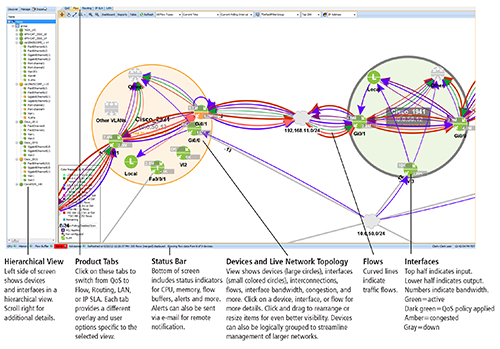
Interactive troubleshooting
Achieve faster troubleshooting of your network—Starting
with the topology view you can instantly spot congested
devices and interfaces on the network by their amber
color. Double-clicking on these areas provides more
detailed information and viewing options for troubleshooting
down to the device and interface levels.

Say goodbye to the CLI
Using the command line interface (CLI) to enter commands
is tedious, prone to error, and requires endless training.
With LiveAction’s intuitive graphical interface, you
can perform complex tasks quickly, confidently, and
safely—and you can do this in REAL TIME on LIVE networks.

Historical Reporting
LiveAction captures NetFlow and QoS data on a daily
basis so you can recreate detailed network conditions
for any date and time you specify.

Features:
NetFlow
- Topology-based NetFlow view
- Aggregate flow or individual flow views
- Display end points as host IP address, host name, application port name or number
- Top 200 flows from each device
- X-Ray view of flows inside router
- Ability to filter flows
- Works in MIB and Collector modes
- Sortable NetFlow table
- Start, stop and pause NetFlow data
- Adjustable NetFlow polling rates
- NetFlow graph—by port, source or destination address
- Built in DNS name resolution
- Historical views, reporting, and playback
Routing
- System level topology view of active routes
- Device route table views in graphical and tabular form
- Route display filtering by protocol
- Route display filtering by destination
- Virtual routing and forwarding visualizations and tables
- Export function—route and route table information, exports device forwarding tables to CSV file
- Troubleshooting—Routing loops and asymmetric routes, routing instabilities, black holes, error summarization
- Policy-based routing (PBR)—Configuration/editing of PBR and Set statements, edit existing route map configurations, check for compliance with PBR rules, displays PBR usage, displays static routes and PBR issues, exports route map statistics
QoS Monitoring and Troubleshooting
- Rate-based NBAR graphs
- Pre- and post-QoS graphs
- Peak and average rate statistics
- Class and interface drop graphs
- Congestion indicators
- Built in CBQoS MIB viewer
- Custom NBAR definitions
- Hierarchical policy graphs
- NBAR unknown port debugging
- GRE tunnel visualization
- Automatic QoS graph resync on policy changes
- Unknown port discovery
- View QoS graphs across routers
- Topology-based QoS state
- Historical views and reporting
- Extreme low level graphs of CBQoS statistics
QoS Configuration
- Full MQC QoS configuration support including WRED, CBQoS, Priority Queueing
- Ability to read existing QoS policies on the router
- Take snapshots of current configuration for future use
- Rollback to previous policies at anytime
- Apply or remove QoS configurations quickly and easily across multiple interfaces
- Ability to push policies to multiple devices
- Hierarchical policy creation for advanced configurations
- Custom NBAR based matches including HTTP URL, MIME, HOST and RTP protocols Build in ACL editor
- CLI command preview
- Built-in rules for QoS settings that highlight violations
- Graphical inbound and outbound QoS editors
- WAN shaping support
IP SLA
- Latency, loss, jitter, MOS performance measurements
- Test Types: HTTP, Jitter, Echo, UDP Echo
- Traffic type configuration
- Protocol type: over 10 protocol types
- DHCP: destination, source, circuit ID, remote ID, subnet mask
- IP SLA topology view (real-time)
- Quick and full test options
- Set up responder at destination
- Edit, save, delete test configurations.
- Export to CSV file
- Historical reporting (live update plotted over timeline)
Multiple Levels:
Topology Level
LiveAction generates amazingly clear and detailed topology views of your network allowing you to literally “see” device connections, routes, flows, interface bandwidth, and more—all in real time. The interactive display lets you pan, zoom, and drag individual network elements across the screen for an even better view.

Device Level
Dive deep into the setup and activity within your Cisco switch or router. See routes and routing tables as well as flows entering, traversing, and exiting the device. View the whole picture or use filters to display specific items. Each day, LiveAction captures and stores historical NetFlow data at the full polling rate for playback of the exact device conditions during that period.

Interface Level
Need even more detail? Click down to the interface view and observe actual traffic in real time. View pre- and post-QoS activity and see the effects of your device configuration changes in seconds. LiveAction also records QoS historical data at the interface level for spotting specific events and trends.

Technical Specifications:
Devices Supported
- Cisco series routers—800, 1800, 2600, 2600XM, 2800, 3600, 3700, 3800, 7200, 7600 (IOS 12.3, 12.4)
- Cisco Catalyst switches—3900, 4500, 6500 series
Technology Module Options
The following are available for 10, 25, 50, or 100
devices
- NetFlow• QoS (monitor and configuration)
- Monitor suite: QoS (monitor only), NetFlow, Routing
- Master suite: QoS, NetFlow, Routing, IP SLA
System Requirements
- Network connection
- Operating system: Windows (Server 2003, XP, or Vista)
- CPU: Pentium 4 class, 1 GHz minimum, 2-3 GHz dual- or quad-core recommended
- System RAM 1 GB minimum—2-4 GB recommended
- Disk space: 100 MB to install—20 GB recommended
Warranty and Support
- 90 day warranty and support including free upgrades
- Online technical support
- Annual software maintenance plans available
Documentation:
![]()
Download the ActionPacked LiveAction Datasheet (PDF).
- Individual components available! Please use our quote request form or contact a representative today for our pricing.
- Pricing subject to change without notice.
| ActionPacked! Networks Software | ||
|---|---|---|
| All-In-One QoS Expert | ||
| LiveAction v2.1-All-In-One QoS Expert 10 *LiveAction Version 2.1, includes Flow, QoS Monitor, Routing & IPSLA for 10 devices |
#LC1-1111-010 Our Price: $11,250.00 |
|
| LiveAction v2.1-All-In-One QoS Expert 25 *LiveAction Version 2.1, includes Flow, QoS Monitor, Routing & IPSLA for 25 devices |
#LC1-1111-025 Our Price: $22,500.00 |
|
| All-In-One QoS Expert Maintenance | ||
| LiveAction v2.1-All-In-One QoS Expert 10 Maintenance, 1 Year | #LC1-1111-010-M1 Our Price: $2,250.00 |
|
| LiveAction v2.1-All-In-One QoS Expert 25 Maintenance, 1 Year | #LC1-1111-025-M1 Our Price: $4,500.00 |
|
For more than 25 Devices, Please use our Quote Request Form here! |
||
| All-In-One QoS Expert Provisioner | ||
| LiveAction v2.1-All-In-One QoS Expert Provisioner 5 Starter Pack *LiveAction Version 2.1, includes Flow, QoS Monitor & Configure, Routing & IPSLA for 5 devices |
#LC1-3111-005 Our Price: $9,995.00 |
|
| LiveAction v2.1-All-In-One QoS Expert Provisioner 10 *LiveAction Version 2,1, includes Flow, QoS Monitor & Configure, Routing & IPSLA for 10 devices |
#LC1-3111-010 Our Price: $14,500.00 |
|
| LiveAction v2.1-All-In-One QoS Expert Provisioner 25 *LiveAction Version 2.1, includes Flow, QoS Monitor & Configure, Routing & IPSLA for 25 devices |
#LC1-3111-025 Our Price: $29,000.00 |
|
| All-In-One QoS Expert Maintenance | ||
| LiveAction v2.1-All-In-One QoS Expert Provisioner 5 Starter Pack Maintenance, 1 Year | #LC1-3111-005-M1 Our Price: $1,999.00 |
|
| LiveAction v2.1-All-In-One QoS Expert Provisioner 10 Maintenance, 1 Year | #LC1-3111-010-M1 Our Price: $2,900.00 |
|
| LiveAction v2.1-All-In-One QoS Expert Provisioner 25 Maintenance, 1 Year | #LC1-3111-025-M1 Our Price: $5,800.00 |
|
For more than 25 Devices, Please use our Quote Request Form here! |
||
| ActionPacked! Networks Professional Services | ||
| LiveAction Professional Services | ||
| Professional Services–On Site Training *Professional Training on ActionPacked products—1 day instructor led, maximum 8 students, not including travel time and expenses. North America only. |
#PT0-0000-000 Our Price: $4,000.00 |
|
| Professional Services–Remote Training Half Day *Professional Training on ActionPacked products—half day (4 hours) instructor led, maximum 15 students. North America only. |
#PS0-0000-001 Our Price: $1,000.00 |
|
| Professional Services–On site *On site technical support for design, installation, configuration, etc.—daily rate, not including travel time and expenses. North America only. |
#PS0-0000-000 Our Price: $2,000.00 |
|
| Professional Services–Remote *Technical support performed from ActionPacked! office—hourly rate. |
#PS0-0000-001 Our Price: $150.00 |
|


