


 ActionPacked! LiveAction Routing
Richly detailed routing layer visualizations plus interactive PBR for Cisco networks
Looking for Pricing? Click here!
Richly Detailed Routing Layer Visualizations Plus Interactive PBR for Cisco Networks
LiveAction Routing provides routing visualization across a live topology view and detailed routing tables in the device level view. The routes are color coded by routing protocol and enables situational awareness of routes between nodes on the network. Real-time visualization and path tracing tools enable easy detection of routing loops, asymmetric routes, and other anomalies that impact network performance. In addition, the module’s policy-based routing viewer/editor provides a high degree of control over traffic policy allowing users to route traffic easily and predictably over user-specified paths. Convenient filtering controls make it easy to focus on specific routes based on their protocols and destinations.
LiveAction Routing Benefits
- Ease of use—An intuitive graphical interface makes it easy to view and troubleshoot routes and to implement policy-based routing without the need to learn and use complicated command lines.
- Rich visualizations—LiveAction provides live topological views with numerous filtering options for highly focused visualizations of the routes on the network. Visual routing paths enable easy correlation traffic flows for quicker problem identification. At the device level, the software also displays a graphical view of the router’s routing table.
- Improved efficiency and performance— Built-in tools and visualizations reduce the time required to troubleshoot network problems and simplifies policy-based routing to improve network security, efficiency, and quality of service.
- Built-In routing expertise—LiveAction Routing is based on Cisco best practices and uses an extensive knowledge base of Cisco routing functions.
- Interactive configuration—The powerful policy-based routing feature allows IT engineers, regardless of their experience level, to create, edit, and execute detailed routing policies and Set statements to achieve very high levels of control with compete ease and confidence.
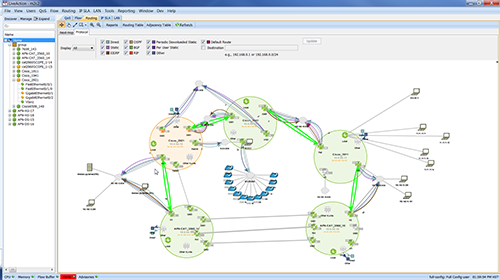
LiveAction displays active routes in real-time. Route filtering and color coding shows routes based on selected protocols and destinations. This simplifies troubleshooting and provides a more focused analysis of specific routes.
LiveAction Routing Features
- System level topology view of active routes
- Device route table views in graphical and tabular form
- Route display filtering by protocol and/or destination
- Quick trace along route path to determine latency and packet loss at each hop
- Next-hop route tracing with return path in topology view
- Virtual routing and forwarding tables
- Support RIP, EIGRP, OSPF, BGP, IS-IS
- Visualization for OSPF/EIGRP adjacency
- Alerts for OSPF/EIGRP state changes
- Troubleshooting—Routing loops and asymmetric routes, routing instabilities, black holes, error summarization
- Policy-based routing (PBR)—Configuration/editing of PBR and Set statements, edit existing route map configurations, check for compliance with PBR rules, displays PBR usage, displays static routes and PBR issues, exports route map statistics
- Routing adjacency history & adjacency event reports
- Export function—route and route table information, exports device forwarding tables to CSV file
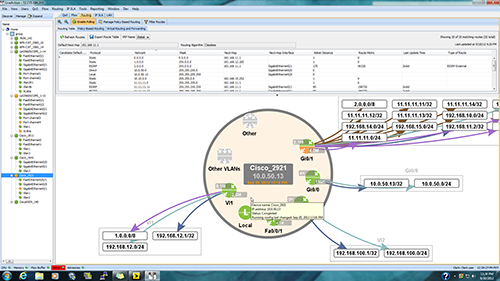
Device-level view displays the entire route table in both tabular form (upper portion) and graphically (lower portion).
Pricing Notes:
- Pricing and product availability subject to change without notice.