


 ActionPacked! LiveAction QoS
Effortless quality of service monitoring and configuration for live networks
Looking for Pricing? Click here!
LiveAction and QoS Monitoring:
Effortless Quality of Service Monitoring for Complex Networks
LiveAction QoS Monitoring provides the ability to track QoS performance on a per-class basis in real-time or for historical time periods. Engineers can gain a deep understanding of traffic and QoS behavior using LiveAction’s application (NBAR), class or queuing views. Monitoring and alerting of priority queue drops provides proactive notification of potential voice quality issues.
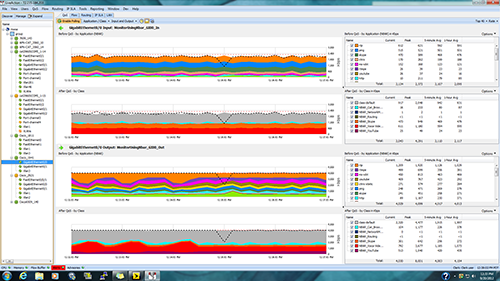
The interface panel displays both the Input (ingress) and Output (egress) traffic for individual interfaces showing traffic before and after QoS is applied.
The Benefits of LiveAction QoS Monitor
- Ease of use: LiveAction’s intuitive graphical interface replaces command line outputs with real-time graphs and an easy-to-understand policy viewer.
- QoS Performance: LiveAction QoS Monitor provides a detailed understanding of QoS performance for individual interfaces, applications, and classes by displaying Before-QoS and After-QoS graphics for input and output directions.
- QoS Congestion Indicators: Live
- Action QoS displays congestion and bandwidth usage from a live system level topology and allows users to drill down to view individual device and interface performance and policies.
- Proactive monitoring: Detect and alert on critical policy drops for voice, video, or critical applications before problems are reported by end users.
- Instant validation: Real-time QoS reporting at both topology view and device view at intervals as short as 10 seconds enables quick validation of policy changes.
- Single-click QoS audit and performance reports: LiveAction generates a highly accurate and intelligently organized report in seconds with just a single click of your mouse. This report will show you everything you need to know about your QoS policies in great detail including configuration settings, performance issues, drops, and policy errors.
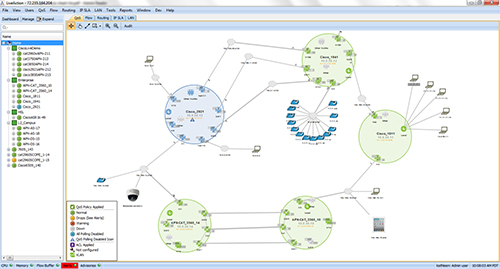
LiveAction QoS Topology
LiveAction QoS Monitor Features
- QoS Dashboard
- Pre- and post-QoS graphs
- Hardware QoS stats and information
- Rate-based NBAR graphs
- Peak and average rate statistics
- Class and interface drop graphs
- Congestion indicators
- Built in CBQoS MIB viewer
- Detailed graphical policy viewer (displays settings for classification, marking, queueing, policing, shaping, compression and WRED)
- Custom NBAR definitions
- Hierarchical policy graphs
- NBAR unknown port debugging
- GRE tunnel visualization
- Automatic QoS graph resync on policy changes
- Layer 2 QoS monitoring support for Cisco Catalyst® 6500, 7600, 3000 and 4000 Series
LiveAction and QoS Configuration:
Effortless Quality of Service Configuration for Live Networks
LiveAction QoS Configure enables IT engineers to create, edit, and apply QoS policies for Cisco routers and Layer 3 switches on live networks with consistency and confidence. Use the QoS wizard and built-in templates to apply policies based on Cisco best practices or use the QoS GUI editor to create and edit your own policies from scratch.
As new voice, video and critical applications are added to the network and the need to add features such as application visibility and Medianet arises, the ability to configure highly complex QoS policies across multiple devices to support these applications can become daunting. LiveAction eliminates the need to resort to the CLI to complete a new QoS or services deployment. With LiveAction, IT engineers can create new QoS policies, validate any changes made, and deploy new technologies, all within a single LiveAction session.
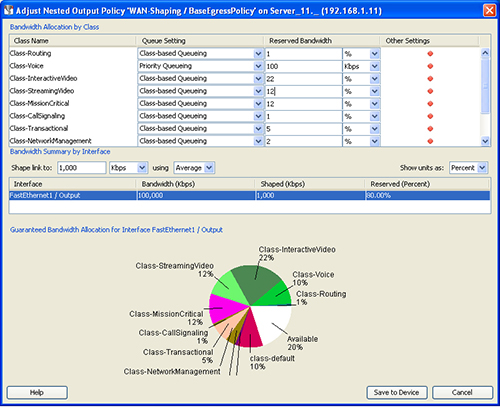
Adjust output policy and set guaranteed bandwidth allocations for specific classes on each interface.
The Benefits of LiveAction QoS Configure
- Ease of use: LiveAction’s intuitive graphical interface replaces command lines with an easy-to-understand policy viewer and editor.
- Built-In QoS expertise: Deep QoS expertise is built-into LiveAction based on extensive research of the features, functions, and even idiosyncrasies of Cisco devices.
- Best-practice QoS templates: Over 25 policy and class templates allow rapid implementation of QoS settings based on Cisco best practices. Users can modify templates or create their own.
- Configuration Change Audit Trail: Tracks who makes what device configuration changes and when they are made.
- Saved Policies: Router QoS configurations can be saved for future use, as backups, or for automatically scheduled configuration changes for one or more devices. Applied policies are intelligently correlated with existing settings.
- QoS audit and performance reports: Single-click push button policy and performance audit report analyzes QoS configurations for errors and performance issues and details the information in intelligently organized and easy to navigate report.
- Additional ROI: LiveAction uses the QoS features built into Cisco devices, eliminating the need to invest in more hardware or specialized appliances.
- Reduces errors: LiveAction reduces configuration errors with easy to apply, rules-based QoS policies and templates
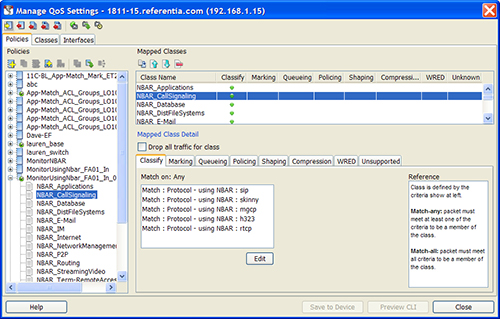
Create and edit QoS policies and use LiveAction’s extensive policy templates or create your own policies from scratch.
LiveAction QoS Monitor Features
- Full MQC QoS configuration support including WRED, CBWFQ, Priority Queuing
- NBAR2 configuration on ISR G2
- Custom NBAR and NBAR2 based matches including high level attributes, HTTP URL, MIME, HOST and RTP protocols
- Read existing QoS policies inside routers
- Take snapshots of current configuration for future use
- Apply or remove QoS configurations quickly and easily across multiple interfaces
- Copy QoS policies across multiple devices
- Hierarchical policy creation for advanced configurations
- Built-in ACL editor
- CLI command preview before applying policy
- Rollback to previous policies at anytime
- Built-in rules for QoS settings that highlight violations
- Configuration change audit trail
Pricing Notes:
- Pricing and product availability subject to change without notice.