


 ActionPacked! LiveAction IP SLA
Effortless visual network testing and performance measurement for Cisco networks
Looking for Pricing? Click here!
Easy network testing and performance measurement for Cisco networks
Through its highly interactive and graphical user interface, LiveAction IP SLA makes it easy for IT managers to use Cisco IOS IP Service Level Agreement (SLA) to generate synthetic network traffic for the purpose of monitoring latency, loss, jitter, and mean opinion core (MOS). LiveAction simplifies Cisco IP SLA operations in 3 ways:
- LiveAction wizard enables easy creation of simple to complex IP SLA tests (HTTP, FTP, DNS, IP SLA VO, etc.)
- LiveAction automatically generates a live topology view showing data paths of IP SLA test traffic and their status
- LiveAction provides reports that include results of IP SLA tests over time
In addition, pre-deployment capacity planning can be accomplished with IP SLA VO. After administering these tests with LiveAction IP SLA GUI, the user can determine how much traffic is generated by these simulated IP SLA VO streams and the associated performance characteristics (delay, packet loss, jitter) by looking at the traffic within the QoS policy that is matching the VO traffic’s DSCP marking and validating application performance with Medianet and Mediatrace.
LiveAction IP SLA Benefits
- Ease of use—LiveAction makes Cisco IP SLA easy to use. An intuitive graphical interface replaces complicated command lines making on-the-fly test configuration and execution easy and understandable.
- Simple test traffic generation—Generates and sends synthetic test traffic from router to router for measuring network performance. Enables detailed editing of test configurations through GUI to simulate complex traffic patterns.
- Rich visualizations—Configured tests are represented graphically on topology views for quick test identification. LiveAction provides real-time charts and tabular results with views of latency, loss, jitter, MOS, and more for IP SLA.
- Proactive monitoring—Use MOS and latency threshold alerts to detect application performance degradations before your users do.
- Interactive—Start, stop, and edit traffic tests in real time.
- Non-disruptive—LiveAction IP SLA is a software-based solution that requires no physical topology changes or service interruptions to install.
- Improved efficiency—Reduces time required for test deployment.
- Pre-deployment capacity Planning—Plan for network capacity requirements before actual rich media application deployment with LiveAction IP SLA VO and QoS monitoring.
- Exceptional ROI—LiveAction IP SLA takes full advantage of existing features built into Cisco devices significantly reducing the need to purchase separate test networks and hardware-based test equipment including external traffic generators, far end-point probes, and analyzers.
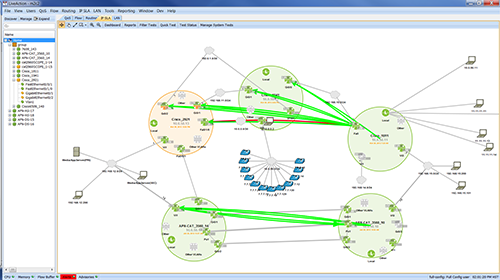
LiveAction topology view of IP SLA traffic paths.
LiveAction IP SLA Features
- Data paths of IP SLA tests on topology view (real-time)
- IP SLA dashboard for high level status of tests
- Measurements for latency, loss, jitter, and MOS
- Test Types: DHCP, DNS, ICMP Echo, FTP, HTTP, Jitter, UDP Echo, Video
- IP SLA VO (Video Operations) for Medianet
- Multiple colors for visualization
- Loss indicators
- Traffic type configuration
- DHCP: destination, source, circuit ID, remote ID, subnet mask
- Quick and easy test configuration with full management options
- Large-scale wizard-based IP SLA provisioning in full-mesh and hub/spoke configurations
- Set up responder at destination
- Edit, save, delete test configurations
- Alerting capability with threshold adjustments for video, voice, or data
- Export to CSV file
- Dashboard and historical reporting (live update plotted over timeline)
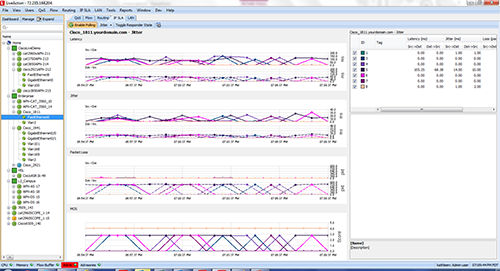
LiveAction IP SLA chart showing graphical view of real-time test data (center) and test properties in tabular format (lower right).
Pricing Notes:
- Pricing and product availability subject to change without notice.